How I run a software agency with Claude connectors doing half the admin work


As you already know, I run a small software development agency. At any given time, I'm juggling a handful of active clients, a mix of new project requests and ongoing maintenance work, a sales funnel that spans LinkedIn, conferences, emails, and the occasional in-person event, and enough admin to fill a second job if I let it.
For a long time, I did let it.
Requests came in through WhatsApp, email, phone calls, and a customer-facing form — all over the place. Leads from a conference would sit in my head/the conference app (if any) until I got to them. Billing meant going through Jira ticket by ticket at the end of the month and summing up hours manually. Statements of Work got generated with a bit of LLM help, but still required me to sit down, piece it together, and get it out the door.
None of it was broken exactly. But it was slow, and a lot of it depended on me remembering to do things.
Claude connectors changed that. Not all at once, and not perfectly — but enough that it's worth writing about.
Here's how I actually use them.
Turning scattered requests into Jira tickets
This was the first thing I wanted to fix. Requests were coming in from too many places — WhatsApp messages, emails, phone calls, a customer form — and the only thing connecting all of them was me manually creating a Jira ticket when I got around to it. Predictably, things fell through the cracks.
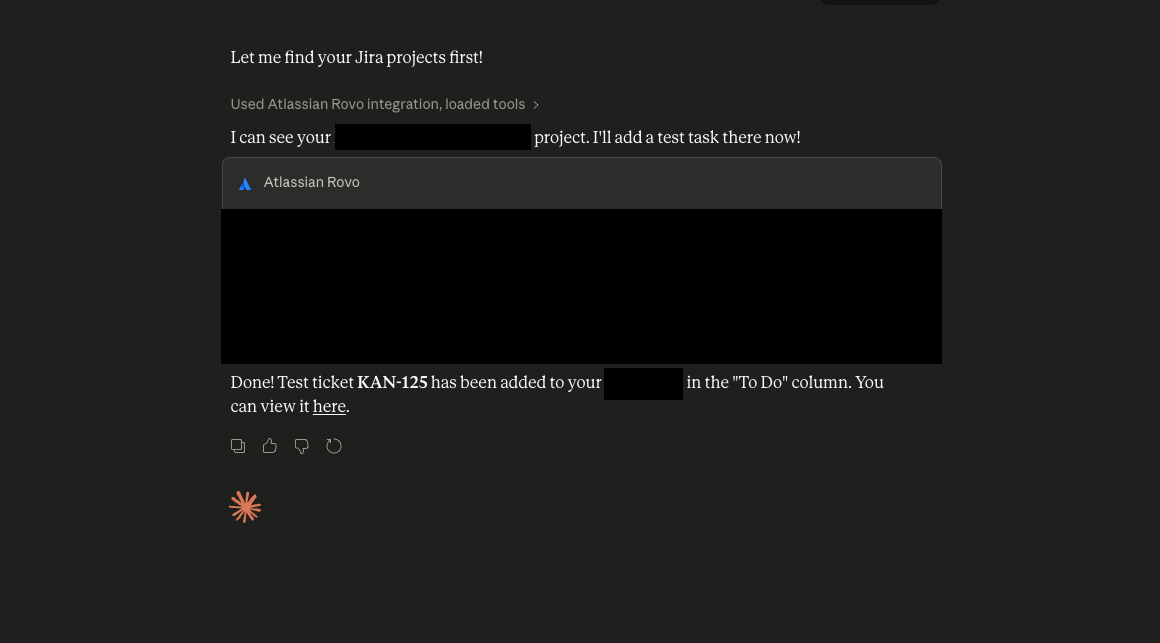
Now I use a Claude connector as the first stop. When a request comes in, I drop it into Claude — whether that's a forwarded email, a screenshot of a WhatsApp thread, or a quick summary of a phone call — and the connector creates the Jira ticket with the right fields filled in. Client, request type, priority, description. It takes me about thirty seconds instead of five minutes, and more importantly, it actually happens instead of sitting on my mental to-do list.
For requests that come in through the customer form directly, that's even more straightforward — those go straight to Jira without me touching anything.
Billing that doesn't take a Friday afternoon
Maintenance billing used to be one of those tasks I dreaded at the end of the month. I'd go through each client's Jira tickets, add up the hours, cross-reference against what was agreed, and build the invoice manually in Wave. For a handful of clients, it's manageable, but it's exactly the kind of repetitive work that's easy to get wrong when you're tired.
With Claude connected to Jira, I can now add hours to tickets and pull a summary of hours per client across all tickets in a given period without going ticket by ticket myself. It gives me a clean breakdown, I sense-check it, and then it feeds into Wave. What used to take a couple of hours on a good day probably takes twenty minutes now. I never actually timed it before — I just know it feels like a different task.
Statements of Work without starting from scratch
I have templates for most of my business documents, like SOWs, proposals, project briefs. The structure is there, the headings are there, and I know roughly what needs to go in each section. What used to slow me down was the actual writing.
Now I drop a screenshot of my interaction with the client or meeting notes, whatever is available — the conversation, the scope discussion, whatever we've agreed — into Claude, and the connector fills in the template. Not perfectly every time, but well enough that I'm editing rather than writing. The finished SOW goes out as a PDF. The whole thing is faster and more consistent than when I was doing it by hand.
Keeping HubSpot actually up to date
This one is probably the most underrated part of my setup. My sales funnel runs across LinkedIn, conferences, emails, and in-person events. Leads come from a lot of directions, and for a long time, HubSpot was more of a wish than a working system — I knew I should be logging things, but I wasn't doing it consistently.
The connector fixed the friction. Now, when I have a conversation with a potential client — wherever that happens — I drop the relevant details into Claude, and it handles the HubSpot entry. Contact info, deal stage, and notes from the conversation. The record actually gets created while the conversation is still fresh, which means my pipeline reflects reality instead of my best recollection of it a week later.
What I've learned from all of this
A few things stand out after running this setup for a while.
Start with the thing that's costing you the most time or causing the most dropped balls. For me that was the incoming requests. Getting that under control first made everything else feel more manageable.
Not everything needs a connector. Some of my workflows are still manual and probably will stay that way. The goal isn't to automate everything; it's to automate the stuff that's repetitive, error-prone, or easy to forget.
The screenshot-to-connector workflow is more powerful than it sounds. A lot of business context lives in conversations — WhatsApp threads, email chains, meeting notes. Being able to just drop that into Claude and have it do something useful with it is genuinely one of the more practical things I've added to how I work.
And the honest version: parts of this are still rough around the edges. Some connectors need more prompting than others. Occasionally,, something needs a manual fix. But the direction is right, and the time I've got back is real.
For those of you running small agencies or consultancies, you don't need a complex AI setup to start seeing the benefit. Claude connectors are a reasonable first step, and the tools you're already using are probably already supported.