How structured AI enters a business (the way I have seen it)


Most clients I work with started off with me building a custom web/ mobile application or IT consulting for their small to medium-sized business. But these days, they have some version of the same goal: "Ricky, is there something in AI that we can do within our company?" What I've found is that most of them want to jump to the solution (something they can show off to their peers) before they even understand the problem. So over time, I have developed a way of working through this.
Here's roughly how it goes.
Step 1: Map what is actually happening
Before we talk about any tools or integrations, the first thing I do is sit with the team and draw out what their current processes look like. Just a simple flowchart in draw.io, or these days, I have grown a liking for excalidraw. Who does what, when, and what happens next. This sounds basic, but most organisations (at least the sizes I work with) have never actually done this. People have a rough idea of the process in their heads, but no one has ever put it on paper.
This step alone is valuable. You start seeing the gaps and the assumptions pretty quickly.
Step 2: Find the low-hanging fruit
Once the map is there, something interesting happens. The bottlenecks kind of just reveal themselves even before we actually complete the map. The conversations with the client usually come to a point in the workflow where they say, " Yeah, we should probably be doing this better." And almost every time, the thing that stands out is some shared Excel file/Google sheet that multiple teams are using to keep everyone in the loop. Someone owns it, someone else updates it, a third team reads from it, and nobody really has a clear picture of what's going on at any given moment.
That file is usually the signal. It's not the problem itself, but rather it's pointing at a process that needs structure.
Step 3: Get the data clean
Before you can automate anything reliably, the data needs to be in decent shape. This is the unglamorous part of the work, but it's the part that makes everything else possible. In practice, "clean" usually means dealing with things like duplicate rows that have been creeping in for months, the same client name spelled three different ways across different sheets, dates formatted differently depending on who entered them, and columns that mean different things to different teams. If you skip this and go straight to building, you're just amplifying whatever mess is already there. So we spend time making sure the data is consistent and in a format that can actually be used before anything else happens.
Step 4: Pick the first integration
Only at this point does it make sense to talk about AI. By now, the right starting point is usually obvious because you've mapped the process, cleaned the data, and can see exactly where the manual effort is piling up.
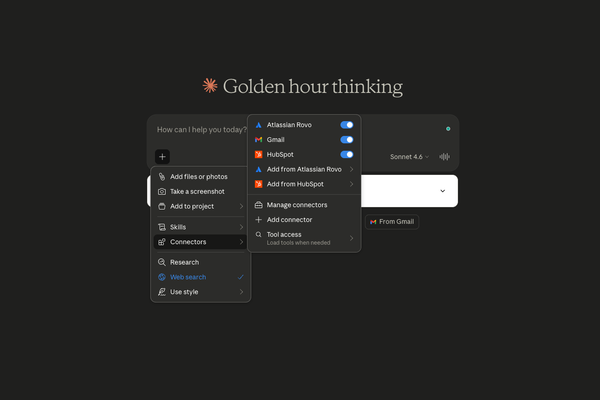
The tool choice really depends on the use case, but I always tell clients: this part is my problem, not theirs. The way I think about it is by complexity. Start with the simplest thing that works and only move up if needed. In practice, that looks something like Claude connectors for straightforward integrations, a custom N8N setup when there's more logic involved, a custom UI with a single agent after that, and at the far end, a multi-agent setup — though in my experience, that last one is usually overkill for where most clients are starting out.
One thing I always try to remind clients at this stage: not everything needs AI. Some parts of the workflow are better handled by simple string parsing or basic software engineering. The goal isn't to put AI on everything — it's to put it where it actually earns its place. Knowing the difference between what needs intelligence and what just needs a decent if-statement is honestly one of the more valuable things you can bring to these projects.
This is where Microsoft 365 or Google Workspace almost always comes up, and for good reason — that's where the work already lives. Most teams are already running their day-to-day out of Excel or Google Sheets, Word or Google Docs, and Outlook or Gmail. So rather than introducing something new, the first integration is usually plugging AI directly into those tools. Reading from a spreadsheet, updating a doc, or responding to a specific type of email. It's the path of least resistance and it tends to get buy-in fast because people can see the impact immediately in tools they already use every day.
Step 5: Give people something to look at
Once the first integration is live, this is the moment where I try to show people what AI can actually do — and I always start with read operations. Before we automate anything or let AI take any actions, we just let it read. Pull from the spreadsheets, scan the docs, look at the emails. The data is usually scattered across three or four different places — a Google Sheet here, an Excel file there, some information buried in an email thread, some in a Word doc nobody's opened in two weeks.
What's powerful about this stage is that for the first time, someone can just ask a question and get an answer that pulls from all of it at once. Instead of opening four tabs and piecing it together manually, you can ask something like "what's the status of all open maintenance requests this month" and get a coherent response that's read across all those sources. That single experience — talking to your own scattered data and seeing it in one place — tends to be the moment where people actually get it. It stops being abstract.
This also builds trust before anything gets automated. People can see what the AI is reading, check whether it's right, and get comfortable with it before it starts taking any actions. That buy-in matters a lot for the steps that come after.
Step 6: Turn the email trigger into a proper workflow
This is where it gets interesting. A lot of organisations have processes that live entirely in email, and they don't always realise it until you map it out with them. A typical example: a client sends in a request, someone on the team forwards it to an external vendor, the vendor replies, someone else follows up, and at some point the whole thing just stalls in an inbox somewhere. Nobody knows what stage it's at, nobody has a record of what was agreed, and the only way to find out is to dig through an email thread. That's surprisingly common, even in businesses that consider themselves fairly organised.
What we do here is treat that incoming email as a structured trigger. Parse it, pull out the intent, create a record, and route it into something that can actually track its progress. The email doesn't go away, but it stops being the system of record.
Step 7: Repeat
Once one workflow is clean and running, the next one is a lot easier. The groundwork is done, the data structure template is in place, the team understands the approach, and there's something working they can point to. From here it's just a matter of identifying the next process and going through the same steps.
The clients who get the most out of this aren't the ones who arrive with the biggest ambitions. They are the ones willing to slow down at the start, map what they have, and build from there. In my experience, the businesses that try to skip straight to the automation end up rebuilding everything six months later anyway, on top of the same messy foundations. Do the boring work first. The results end up being a lot less boring.