Uniportal.ai in Practice: The AI Teammate Assisting IT MSP Operations
Onboarding, offboarding, access reviews, license audits, documentation lookups — the work that fills an MSP's day is exactly the work Uniportal was built to run. Here's what that looks like across a real stack, and where it's headed next with Autopilot.

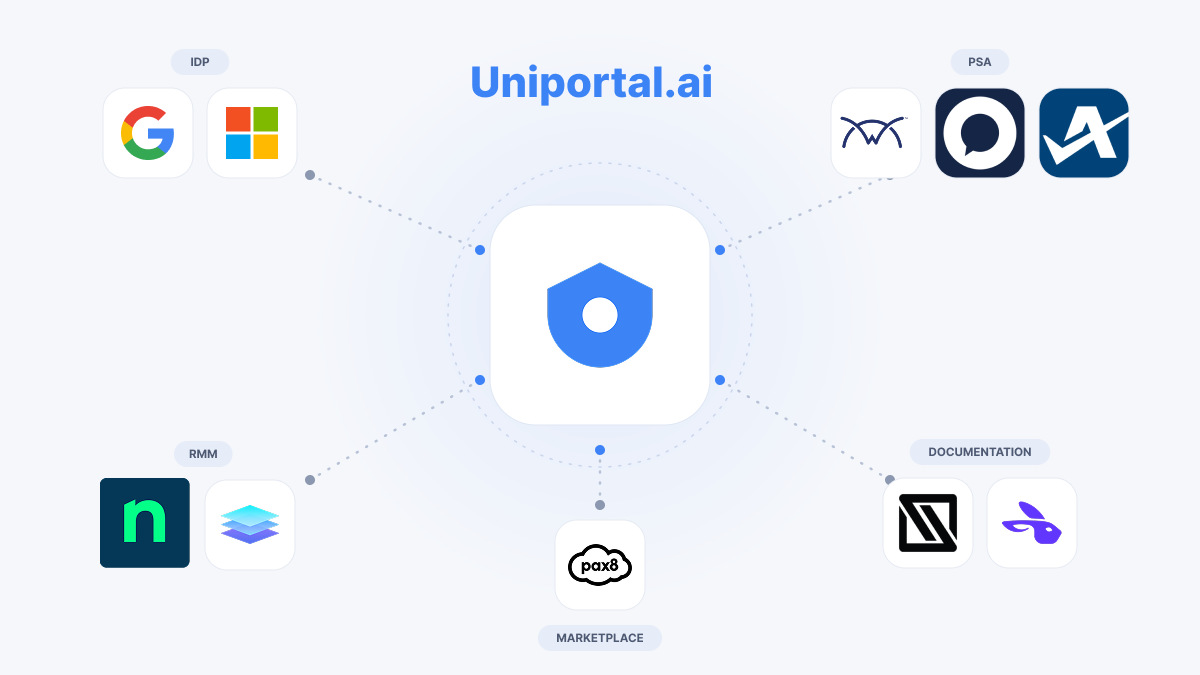
Most MSP software is a place to look at your clients' environments. Uniportal is a place to act on them. An AI teammate that reads a ticket, understands the tenant behind it, and does the work across Microsoft 365, Google Workspace, your PSA, your RMM, and your documentation, all from one conversation.
We spend a lot of time looking at tools in this space, and the ones worth talking about share a trait: they collapse work that used to span five tabs into a single, reviewable action. Uniportal is the clearest example of that we've come across. Here's what it does day to day.
One teammate, the whole stack
The premise is simple. Instead of a tech pivoting between the PSA, Entra, the RMM, and the documentation platform to complete one request, they describe what they need in plain language, and Uniportal assembles the context and the actions for them.
Under the hood, it's deeply integrated across the systems MSPs actually run:
- PSA — HaloPSA, ConnectWise, and Autotask, for tickets, companies, time entries, and checklists.
- Identity — Microsoft Entra ID / Microsoft 365 and Google Workspace, both as first-class identity providers.
- RMM — NinjaOne, for device and endpoint context.
- Documentation — IT Glue, with semantic search across everything documented.
- Licensing & provisioning — Pax8, for subscriptions and provisioning.
- Email — Exchange Online, for mailbox permissions, shared mailboxes, and delegation.
That breadth is the point. A request rarely lives in one system, so the automation can't either.
Use case: offboarding, done in one pass
Offboarding is the workflow every MSP runs constantly, and nobody enjoys. In Uniportal, it's a single request.
A tech presses "Help me resolve this ticket," and Uniportal pulls the whole picture. Who the user is, what groups and licenses they hold in Entra, what devices are tied to them in NinjaOne, what's documented in IT Glue and produces one plan spanning four systems:
- Reset the password, revoke active sessions, and block sign-in in Entra ID
- Convert the mailbox to shared and grant the manager delegate access in Exchange Online
- Mark the user inactive in the PSA
- Update the offboarding checklist in IT Glue
Eight actions, four systems, described once and run the same way every time. What used to be fifteen minutes of careful tab-hopping becomes a plan the tech reviews and approves in seconds.
Use case: onboarding a new hire
The same engine runs the reverse. A new-hire request becomes a coordinated setup: create the identity, assign the right group memberships and licenses, provision the mailbox, and reflect it all back in the PSA and documentation. Because Uniportal is reading live tenant state rather than assuming a template, the plan reflects this client's groups and this client's licensing and not a generic script that breaks on the first environment that doesn't match.
Use case: access reviews and license audits
Some of the highest-value MSP work is investigative. "Who has a Global Admin role in this tenant?" "Which users are assigned this license, and who's paying for seats they don't use?" "Show me the sign-in activity for this account."
Uniportal answers these directly by querying licenses, directory roles, and sign-in logs across a tenant and returning a clean summary instead of a raw export. A license audit that used to mean opening a portal per user becomes one question with one answer, which is exactly the kind of recurring review that quietly eats a service desk's month.
Use case: your documentation, actually usable
IT Glue is where MSP knowledge lives, and finding the right piece of it under pressure is its own tax. Uniportal indexes documentation with semantic search, so a tech can ask a question in plain English, "what's the VPN setup for this client?" and get the relevant document back, scoped to the companies they're allowed to see. The documentation stops being an archive you dig through and becomes something the AI reads on your behalf.
Skills: automations written in plain English
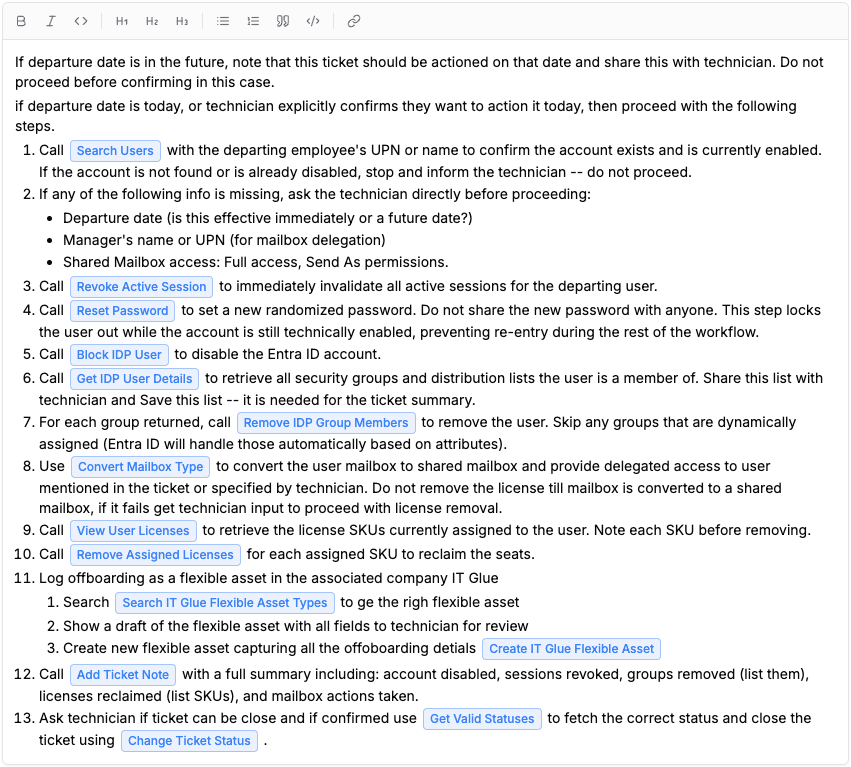
The workflows above aren't hard-coded. They're Skills that are repeatable processes written the way a senior tech would explain them to a new hire, in plain English, with no builder, logic nodes, or scripting. Describe the process once and Uniportal plans and runs it on demand, the same way every time. The people who know the process, the techs running it every day, are the ones who can automate it, which is where that knowledge should have lived all along.
Control that makes automation trustworthy
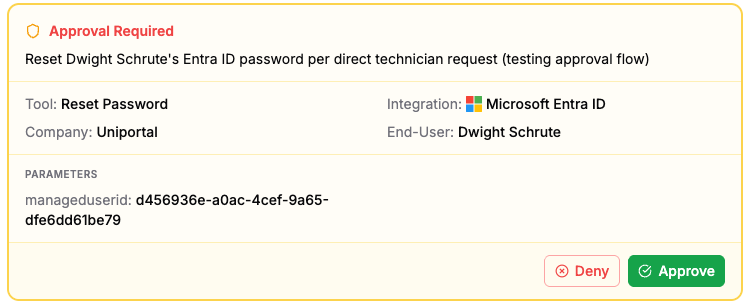
What makes all of this safe to point at real client tenants is the control layer. Every action that changes a client environment is presented as a plan first: every step, which system it touches, what it will change, and executes only after a human approves it. The gate is enforced by the platform, not bolted on as a prompt. And every action that runs is captured with a full audit trail, so when a client asks what happened to an account on a given Tuesday, the answer is one place, not a reconstruction across four vendor portals.
The result is the combination MSPs have wanted from automation all along: the speed of an agent doing the work, with a human holding the decision and a clean record of everything that happened.
What's next: Autopilot
A lot of MSP work doesn't change anything, like reading, correlating, and deciding what deserves attention. That's where Autopilot comes in, a mode built to run those low-risk, read-only workflows end to end without a technician in the loop.
The first use cases are alert analysis and triage: Uniportal ingests an alert, pulls the surrounding context from the PSA, RMM, and documentation, works out what it actually is, and either clears the noise or escalates a clean, enriched summary to a human when something genuinely needs hands. It's the natural next step to let the AI own the analysis, and reserve human attention for the moments that call for it. Autopilot is on the roadmap and expanding the set of workflows an MSP can hand off entirely.
The bottom line
Uniportal turns the repetitive core of MSP operations, i.e., onboarding, offboarding, access reviews, license audits, documentation lookups, into single, reviewable actions across the whole stack, with an AI teammate doing the legwork and a technician holding the wheel. For any MSP where that work is where the hours go, it's worth seeing in action.
Uniportal gives MSPs an AI teammate that works across Microsoft 365, Google Workspace, your PSA, your RMM, and your documentation. Learn more.